Display tool
Check-In
A daily pulse on how students feel.
Give every student a quick, private way to share how they're doing. Read the room's mood at a glance and watch how the class trends across weeks.
Free with every TeacherStack account
On the classroom display
How it works
Check-In in three steps
Here’s the whole flow, start to finish.
1
Pick a prompt
Choose an emoji scale or write your own check-in question for the day.
2
Students tap in
Each student quietly picks how they feel as they settle in.
3
Review the trends
See where the class landed today, and watch how the mood moves across weeks.
A quick read on how the class is doing
Checking in should feel safe for students and take you almost nothing to keep up.
One-tap scale
Students pick where they’re at on a simple five-point scale — Great down to Struggling — in a single tap.
Private by default
Answers never appear on the display for the class to see. They go to you, and only you.
Trends over time
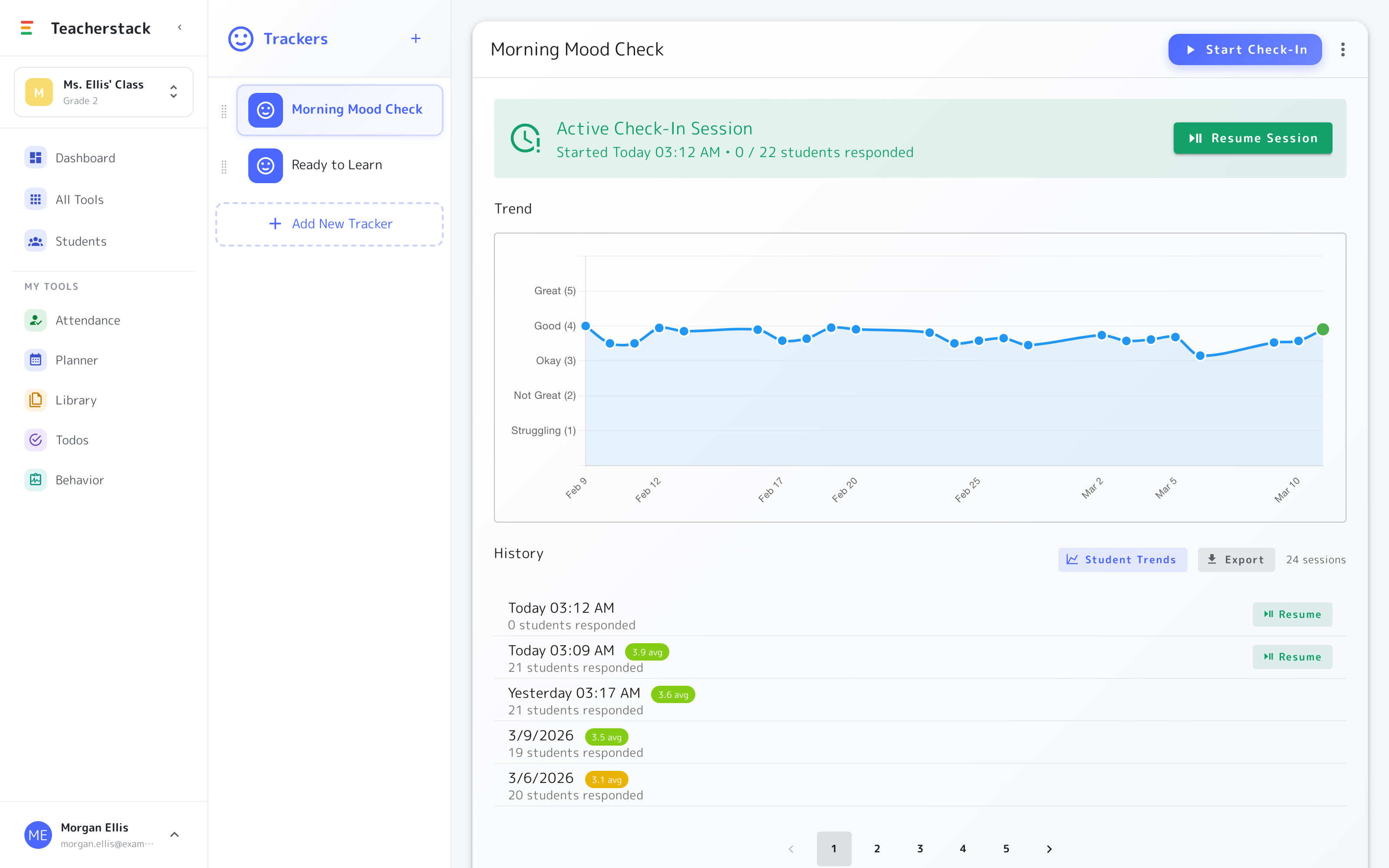
A line chart tracks the class across weeks, so a hard stretch stands out before it adds up.
Your own trackers
Go beyond mood — build a “Ready to learn” or energy check-in, and keep each one’s history.
The trends view
See the whole class over time
Every check-in rolls up into a picture of how the class is doing, week over week.
- 1Watch the trendA line across the weeks shows whether the class is climbing or dipping, so a rough stretch stands out early.
- 2Every session, savedEach check-in is logged with the date, how many responded, and the class average — ready to revisit any time.
- 3More than moodRun several trackers side by side — “Morning Mood Check,” “Ready to Learn,” or one you build yourself.
Lives on the whiteboard
Students tap in on the display as they arrive, but each answer stays private to you — the board shows the routine, never how anyone's actually feeling.
Get Check-In and the whole stack
One free account includes every TeacherStack tool.
Sign up — it's free